Se afișează postările cu eticheta iPhone 3G. Afișați toate postările
Se afișează postările cu eticheta iPhone 3G. Afișați toate postările
marți, 3 august 2010
Universal SIM Update & Configuration v5.5.0
 Universal-SIM iPhone 3G V550
* Default settings are: Use card ATR / Use standard baudrate (~10k)
* What's new:
solved bugs for some carriers ( TMobile & More )
updated internal simcard routines
removed unneeded setting ( SIM / USIM )
removed unneeded speeds selection
Before you insert Universal-SIM into phone:
1. check again if 3G is enabled Settings -> General -> Network -> Enable 3G
2. check Data Roaming is enabled Settings -> General -> Network -> Data Roaming
3. make the appropriate APN settings in Setting -> General -> Network -> Cellular Data Network
Download
http://rapidshare.com/files/172714623/Universal_SIM_Update___Configuration_v5.5.0_iphone3g

How to Unlock Your iPhone With iLiberty+
iLiberty+ will open onto the standard tab.
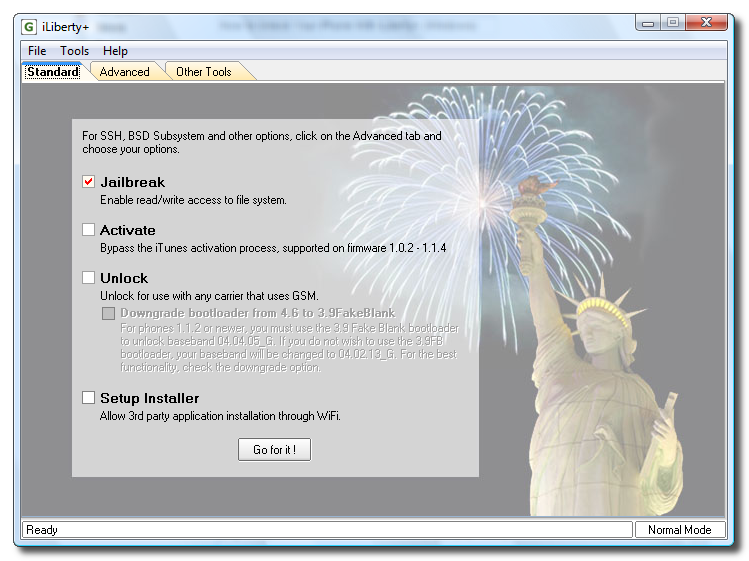
Check the operations you would like to perform. If you are unlocking you would most likely choose all 5 options!
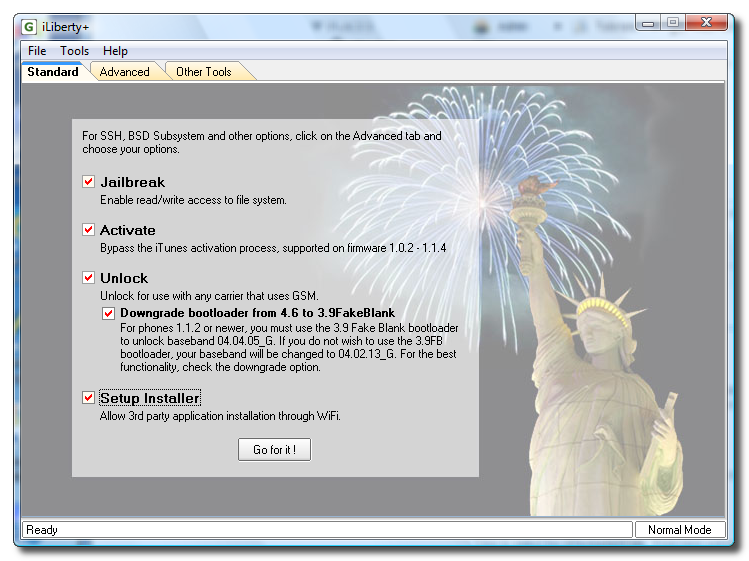
Step Ten
Click to select the Payloads tab. From here you can select additional payloads to install while unlocking or jailbreaking. We will leave this alone for now and go back to the Standard tab. Note***: A tutorial on how to download and install payloads will be posted in the near future.
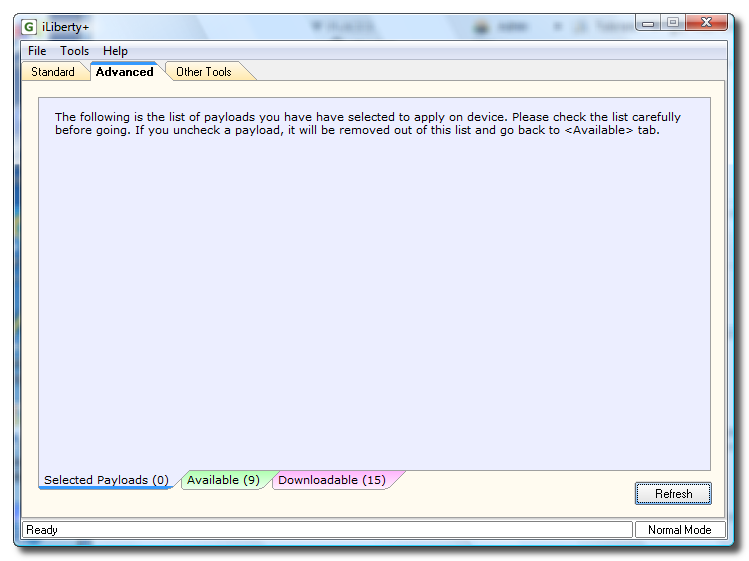
Step Eleven
Click the Go for it! button from the Standard Tab to begin.

Next I got a message that asked me to disconnect then reconnect my iPhone and click the OK button.
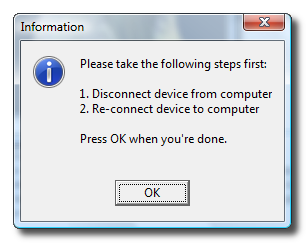
Step Twelve
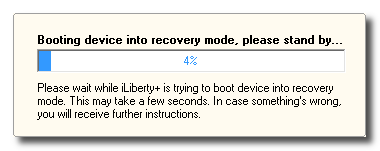
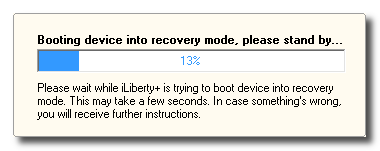
You will then notice a status bar appear. Unfortunately, mine only displayed until around 13% and then disappeared. No worries though, the unlock procedure continued and finished successfully. I was not notified that it did by the software. Just watch your iPhone until it comes to rest at the "Slide to unlock" screen.
iPhone Aio Unlock
 Unlock iPhone free
Cool iPhone Software
Books & Guides iPhone
Download
http://rapidshare.com/files/180050877/iPhone_Unlock_Aio
iPhone 3G 2.2 Unlock

Supported Modeles:
Unlock iPhone 3G 2.2
Download
http://rapidshare.com/files/243299304/3gunlock_
Redsn0w OS 3.0 Jailbreak

Read the whole post in full before attempting anything!
redsn0w is an easy to use, multi-platform, multi-device jailbreaking and unlocking tool for the iPhone 2G (original iPhone), the iPhone 3G (but not the 3GS) and also the iPod touch (first and second generation). Currently it is available for Windows and Mac OS X (there are some issues using redsn0w with OS X PPC, please use an Intel Mac until we have this problem resolved).
REDSN0W PROVIDES SIMILAR FUNCTIONALITY TO QUICKPWN.
If you want to build custom firmware files with more flexibility it is suggested that you use ‘PwnageTool’ on Mac OS X.
GOLDEN RULE: If you are using a 3G iPhone with yellowsn0w and rely on yellowsn0w to obtain cellular service, then you should NOT use redsn0w right now. Ultrasn0w (the 3G carrier unlock) is not included with this release and therefore your baseband will be locked and unable to use an operator other than the official one it was bought for. UltraSn0w will be released via APT (cydia and icy) soon. If you have an original iPhone (1st generation) then 3.0 carrier unlock works with this redsn0w release.
Yellowsn0w in its current form will NOT work with the baseband version that is present in the 3.0 update, you will need Ultrasn0w, which will be released sometime soon, Ultrasn0w will work with all iPhone 3G models (but not 3GS), even ones that were previously unlockable, Ultrasn0w (when available) will be released via APT (this means you will be able to get it via Cydia or Icy).
Please read all parts of this post before downloading and using these tools.
Read items 1, 2 and 3 again and again.
At the bottom of this post are the bittorrent files for the latest version of redsn0w.
This app is suitable for the recent 3.0 release
redsn0w will NOT work for the iPhone 3GS.
redsn0w WILL work for Original iPhone (1st Generation), Original iPod touch, iPod touch 2G and the iPhone 3G (not the iPhone 3GS).
At This Time Supported Phones
iphone 2G >>> Jailbreak +Unlock
iphone 3G >>> Only Jailbreak Possible
ipod 1G>>>> Jailbreal Possible
ipod 2G >>> Jailbreal Possible
Note >>>> Not Working With Iphone 3GS
Download
Guides
How to Jailbreak Your iPhone on OS 3.0 Using RedSn0w (Windows)
How to Jailbreak Your iPhone on OS 3.0 Using RedSn0w (Mac)
Windows
http://www.chemicalwebs.com/redsn0w/...-win_0.7.1.zip
http://www.gotokohsamui.com/redsn0w-win_0.7.1.zip
http://72.14.179.250/Downloads/redsn0w-win_0.7.1.zip
http://linhsex.net/data/redsn0w/redsn0w-win_0.7.1.zip
http://download.server-land.com/reds...-win_0.7.1.zip
http://asifzia.com/redsn0w-win_0.7.1.zip
http://g.appleguru.org/redsn0w-win_0.7.1.zip
http://iphone.h4ck.org.il/redsn0w-win_0.7.1.zip
http://bentkowski.com.pl/redsn0w-win_0.7.1.zip
Mac
http://download.server-land.com/reds...0w-mac_0.7.zip
http://therepository.binarytide.com/...0w-mac_0.7.zip
http://www.bielsipod.de/Daten/redsn0w-mac_0.7.zip
http://necoda.com/redsn0w-mac_0.7.zip
http://g.appleguru.org/redsn0w-mac_0.7.zip
http://download.desteini.com/mac/redsn0w-mac_0.7.zip
http://schaffnerd.com/redsn0w/redsn0w-mac_0.7.zip
FROZEN OS3 iphone3g unlock v0.2b

Supported Modeles:
Unlock iphone3g OS3
Download
http://rapidshare.com/files/254599933/FROZENOS3_iphone3g
ZiPhone GUI3 by Unlock.no v3.1

Supported Modeles:
ZiPhone GUI3 by Torkzade
Unlock iPohne3G free
Download
http://rapidshare.com/files/254499054/ZiPhoneGUI3_by_Torkzade
iPhone v3.1.2 Unlocker

Supported Modeles:
Unlock IPhone 3G,3GS OS v3.1.2 without wifi 100%
1- install latest version Itunes
2- Restore by itunes original Firmware V3.1.2
3- use BlackRa1n
4- Restore again custom firmwares V3.1.2
5- use again BlackRa1n
6- Run instal.bat
Download
http://rapidshare.com/files/306093472/Unlock_Iphone_3g_3gs_V3.1.2_by_Ramjan_-
iPhone Firmware v2.2.1

Supported Models:
iPhone
QuickPwn 2.2-2 for Windows
Firmware v2.2.1 support by Vortex
Download
BootLoder
http://hotfile.com/dl/31595348/2d2515f/BootLoader.rar.html
QuickPwn22VTX
http://hotfile.com/dl/31596808/3a99f72/QuickPwn22VTX.rar.html
iPhone 2G Firmware iPhone1,1_2.2.1_5H11_Restore.ipsw
&
iPhone 3G Firmware iPhone1,2_2.2.1_5H11_Restore.ipsw
Unlock iPhone 3.1.2 Free

Supported Models:
Unlock iPhone 3.1.2 Free and baseband 05.11.07
blacksn0w Unlocker for iPhone 3G and 3GS
simple jailbreak used to install unlock
blackra1n RC3 is also live for both Windows and Mac
Clean firmware 3.1.2 and baseband 05.11.07 are recommended.
Updates:
Unlock
Hacktivation
Keep legit activation if activated before running app
15 seconds faster, you'll feel it
Mac OSX 10.4+Tiger + PC support
instruction How to Unlock iPhone with blackra1n
Download
blackra1n For Mac
http://hotfile.com/dl/31600642/3cbcff0/blackra1n_Mac.rar.html
blackra1n For Windows
http://hotfile.com/dl/31601081/4ce4768/blackra1n_Win.rar.html
PwnageTool 3.1.3 update İphone 3GS Jailbreak

Supported Models:
SUMMARY:
The iPhone 3GS is now supported in PwnageTool 3.1.3, assuming the phone was pwned at 3.0 or 3.0.1 - PwnageTool does not support the 3GS out of the box. If your iPhone 3GS has 3.1 preinstalled and is not Pwned then there is no tested jailbreak solution at the moment.
The iPod 2G is now supported in PwnageTool 3.1.3, assuming the iPod 2G was pwned at 3.0 or 3.0.1 - PwnageTool does not support the iPod 2G with 3.1 software out of the box.
DETAILS:
- GOLDEN RULE: If you are using a iPhone 3G or iPhone 3G(S) with ultrasn0w and rely on ultrasn0w to obtain cellular service then you should only update your device with an .ipsw that is made with the new PwnageTool. There are no second chances with this. You need to remember that PwnageTool will provide an upgrade path to newer versions of the iPhone software in the future.
- Please read all parts of this post before downloading and using these tools.
- Read items 1, 2 and 3 again and again.
- At the bottom of this post are the bittorrent files for the 3.1 capable version of PwnageTool.
- PwnageTool will work for the iPhone 3GS assuming you have already Pwned it at 3.0 or 3.0.1
- PwnageTool will work for the iPod touch 2G assuming you have already Pwned it at 3.0 or 3.0.1
- PwnageTool WILL work for Original iPhone (1st Generation), the iPhone 3G and iPhone 3G(S) and the iPod touch (1st Generation and 2nd Generation) but NOT the iPod touch 3rd generation.
- For 3G and 3G(S) users who are Pwned, PwnageTool is your key to updating in the future, just remember to never install an update directly from Apple, always use an .ipsw that has been created with PwnageTool.
- There is no Windows version of PwnageTool it is a Mac OS X tool only, we are not developing a Windows version of PwnageTool.
What’s a Baseband?
The ‘baseband’ is the generic nickname given to the internal components of the iPhone that handle the phone calls and Internet access. This ‘baseband’ is a tiny and unique independent computer system that runs inside your iPhone, it is separate to the main system that handles the applications (such as email and google maps) and it talks to the main part of the phone over an internal communications network.
Think of it like a cable modem or other peripheral that is attached to your home PC that needs occasional updates. When a software update is released and presented to you within iTunes the baseband is sometimes updated (to fix bugs or add new features).
The 3.1 update for the iPhone 3G and 3GS contains such an update, so running the vanilla updater straight away with iTunes will reprogram and update the baseband.
WHICH DEVICE DO I HAVE?
Read the description to identify your device, once you have correctly identified your device follow the specific instructions for that device as listed below.
SIM Free/SP Unlocked/Factory Unlocked iPhone 3G(S)
This applies if you bought your iPhone 3G(S) for $$$$$$$. This model of iPhone 3G(S) doesn’t have an Service Provider lock (aka factory unlocked) and you are able to put any SIM card into the phone and get service. Your phone is already unlocked so you do not need to worry about baseband updates, if your device was Pwned at 3.0 or 3.0.1 then you can use PwnageTool to create an ipsw and then use this to update and jailbreak your phone.
SIM Free/SP Unlocked/Factory Unlocked iPhone 3G
This applies if you bought your iPhone 3G for $$$$$$$. This model of iPhone 3G doesn’t have an Service Provider lock (aka factory unlocked) and you are able to put any SIM card into the phone and get service. Your phone is already unlocked so you do not need to worry about baseband updates, if your device was Pwned at 3.0 or 3.0.1 then you can use PwnageTool to create a 3.1.ipsw and then use this to with iTunes to upgrade and jailbreak your phone.
iPhone 2G (1st Generation)
Use PwnageTool to do the magic and then restore with iTunes using your newly created .ipsw ‘nuff said, you don’t need to worry about anything, the baseband will be unlocked, the phone jailbroken.
iPod Touch 1G (Original iPod Touch)
Use PwnageTool to create a firmware image and restore with that .ipsw using iTunes.
iPod Touch 2G
Use PwnageTool to create a firmware image and restore with that .ipsw using iTunes, this will only work if you are already Pwned at 3.0 or 3.1. If you are at 3.1, downgrade to 3.0 and use redsn0w to Pwn 3.0 then you have an upgrade path using PwnageTool.
iPod Touch 3G
At this time PwnageTool does not support this device.
Downloadhttp://hotfile.com/dl/33619471/2e2ae62/PwnageTool__3.1.3
marți, 27 iulie 2010
Speed Test Comparison: iPhone 4 Vs. iPhone 3GS Vs. iPhone 3G Vs. iPhone 2G
One of the things to look forward to when you upgrade to the next generation iPhone is improved performance due to faster processor, more RAM etc.
Folks at Gadgets DNA have discovered a YouTube video by Mike Hellers who has compared all the four generations of iPhone to show the performance improvements.
Mike Hellers and his friend Chris carried out the following tests on iPhone 4, iPhone 3GS, iPhone 3G and iPhone 2G:-
Load time of iPhone game – Planet Vs. Zombies
-
Load time of iPhone app - Google Earth
-
Load time of iPhone – Seadragon Mobile
-
Time taken to load Yahoo on iPhone’s Safari browser
You can checkout the video to find out the timings:
No prizes for guessing, which one was the fastest and the slowest iPhone.
It was interesting to see the performance improvements that Apple has achieved with the iPhone platform over the last few years.
What do you think?
Abonați-vă la:
Postări (Atom)