Se afișează postările cu eticheta hack wii. Afișați toate postările
Se afișează postările cu eticheta hack wii. Afișați toate postările
marți, 27 iulie 2010
Wii Maintenance Mode
Hello,
At this time, the “Maintenance Mode” you discovered has no functionality for consumers. If at some future point a consumer application for this mode is made available, it will be revealed on our website (www.nintendo.com).
Even though it appears—with the exception of the Wii Message Board—that everything functions normally in this mode, we do not recommend using it at this time.
Sincerely,
Nintendo of America Inc.

Wii Browser SDK - Javascript API Supports 4 Wiimotes
The Wii Remote data is accessed through the opera.wiiremote object. This object offers a single method opera.wiiremote.update(n) which is used to obtain the status of an individual Wii Remote. The method expects a single parameter; the Wii Remote number. The number is zero-based, so it starts at 0 for the first remote, and ends at 3 for the fourth remote. The method returns a KpadStatus object, which has several properties that give information about the remote. [source]
Wii Hacked - First Homebrew Demo
Wii Homebrew Channel Launched
Vitality Sensor info
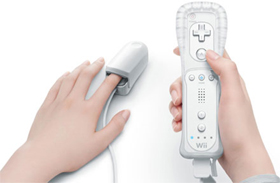 At this year's E3 Expo, Nintendo revealed a new peripheral for Wii called the Vitality Sensor. This little gizmo fits on the end of your index finger and can measure certain stats about your body's state. Now some extra info has come out describing how it all works.
The Guardian newspaper says this device uses a small light sensor to look at your blood flow and calculate things like how hard you're breathing.
Wii-mote Skins
Wii-mote Skins
 The year 2009 is full of new innovations from Nintendo Wii and its team. We are experiencing a new gaming experience thanks to the wonderful work of the staff. The massive market of amazing new Nintendo Wii games and with multi player mode give us the opportunity to play with our family or friends.
That is why I like havin different Wii remotes, different colors and now the Wii remote skins give me that occasion. You have many different colorful products that will satisfy your needs no mater if you are a women or man, you have colors from pink to green or blue and many others. Make your game play more colorful with the beautiful covers for your Wii remote.
Load Your Wii Games from a Hard Disk
Why would you want to play your games off a hard disk? Wii games cost anywhere from $20-50, while an external hard drive that can hold all your Wii games—assuming you don't already have one on hand—costs $100 or less. Backing up your games to an external hard drive attached to your Wii costs less than the replacing two premium games, and has the added benefit of loading your games radically faster.
Last week we shared a Wii backup tutorial, put together by Lifehacker reader Mike. With a newer Wii or an upgraded your dashboard, the process involved quite a bit of tinkering and downgrading your dashboard. Mike sent us an updated guide that's easy to follow and has very detailed step-by-step instructions for enabling the hack on Wii consoles sporting the new 4.0 dashboard. All you need for the hack is a Wii you don't mind mucking around in, a blank SD card, an external USB 2.0 hard drive that will be totally dedicated for the project, and a handful of software tools freely available online. Check out Mike's excellent and updated tutorial at the link below for more details. Thanks Mike!

Wii Motion Plus

AirDeck Wii Theremin and DJ Scratch App
Here is some video I shot shortly after my project presentation which demonstrates the AirDeck virtual theremin application I designed and explains some of the features. It uses the Wii remote as an input mechanism by tracking motion with Infrared LEDs. The AirDeck is written in Java with the WiiUseJ API for handling Wii remote events and the JSyn API for internal synthesis. It can control MIDI out as well as offering a simple DJ scratch interface for real-time manipulation of sound samples similar to a DJ scratching with vinyl records. After about a year of working on this project, I am very relieved that it is finished. I’ve learned a lot and am looking forward to possibly working on other similar concepts in the not too distant future.
marți, 20 iulie 2010
How To Play USB Games From The Wii Menu
This guide will allow you to play Wii games stored on a USB device OR SD

[-----GUIDE-----]
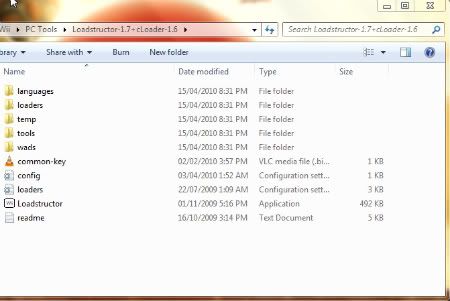
Download -- Loadstructor-1.7+cLoader-1.6.rar Extract with WinRAR --(See Screen Shot)
Download -- WiiScrubber -- Extract with WinRAR
You need to create the "common-key.bin" file and copy it to the Loadstructor folder.
You can make one easily using "MakeKeyBin.exe" contained within the WiiScrubber Folder.
You can make one easily using "MakeKeyBin.exe" contained within the WiiScrubber Folder.
LoadStructor Folder Screen Shot
Creating The Forwarder Wad With Loadstructor
1. Connect your Drive to your
Your games should now show as a list. For this Guide I will use Red Steel (First One) as an example of how to make a forwarder channel for an alt.dol game. For a list of Alt.dol games see the end of this post.
2. Choose the game you want to make a forwarder for and select "Add ISO".
The first window will return and should list the game you picked under "ISO files List"
3. At the bottom of the window you will see "Output Folder". This is where your wads will be outputted to. Change the path if you want.
Note: If your game does NOT use an alt.dol then SKIP Step 4 and move to Step 5.
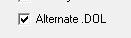
4. You will see a check box that says "Alternate.DOL". Make sure that box is checked or this will not work. (You don't need to change any of the other options)
5. Click RUN! Wait for it to do its thing and you can exit when it has finished.
6. Navigate to the "output folder" that you selected earlier, and copy the .wad file to the "WADS" folder on your SD card.
Extracting the alt.dol with WiiScrubber
Note: If your game does NOT use an alt.dol then move ahead to "Installing The WAD"
Now that our wad file is made we need to extract the alt.dol from our ISO. You will need a copy of the ISO on your computer for this part.
Download WiiScrubber If you haven't yet.
7. Open WiiScrubber and select "Load ISO". Open the ISO you are making the channel for. (Red Steel In my case).
8. Expand the partition (+/- buttons) and look for the alt.dol your game uses (I'm looking for red steel.dol). To find out what alt.dol you need to extract see below, if your game is not listed below please let me know.
9. When you find it, Right Click and select extract. Select the folder you want, and save it.
Exit WiiScrubber.
10. Navigate to the alt.dol you extracted and rename it to the first 4 letters of your game ID. Mine will be renamed REDE.dol, because the game ID is REDE41.
You MUST Create a folder on the root of your SD card called "usb-loader". Then Move the renamed .dol file to that folder.(This is where the channel will look for the alt.dol so it NEEDS to be there or it won't work).
Installing the WAD
Put your SD card in your
Load Wad Manager and select IOS249 to install.
Navigate to your wad file and Press A to Install.
Wait -- Exit wad manager and the HBC. When you return to the wii menu you should see a channel for your game. Make sure your Drive and SD card are plugged in before trying to use the channel.
I recommend backing up ANY wad you install on your PC for easy uninstall later on.
You should now have a working Forwarder channel for your alt.dol game on your Wii Menu!
**If your channel didn't work, try the Alternate Pack - - Follow the same Steps - Also See the EXTRA Section Below.
Alt.dol Games List
FIFA 08
Use main.dol
Indiana Jones And The Staff Of Kings
Use fateatlantis.dol
Medal Of Honor: Heroes 2
Use Game.dol
Metal Slug Anthology
To launch Game 6 Use ms6.dol.
Mortal Kombat Armageddon
Use MK7.dol
Madden NFL 07
Use madden.dol
Madden NFL 08
Use maddens.dol
Red Steel
Use Red Steel.dol
SSX Blur
Use ssx.dol
The House Of The Dead 2
Use hod2.dol
Boogie
Use ssx.dol
NOTE: Wii Motion Plus Games only require an Alt.dol for watching the Motion Plus Video. That is why these games aren't included in the ALT.dol list. Channels for these games can be made WITHOUT using the ALT.dol method. (After watching the WMP Video) An Example of these games -- Red Steel2 and Wii Sports Resort.
- - - - -
EXTRA
If you use these options -- Do them AFTER Step 4 And BEFORE STEP 5.
For SD card Loading (Vs USB) -- Change the "Boot From" Option in the Drop Down Menu, to "SD"
Out Of Region Games -- Change the "Video Mode" Option
Changing Language -- Change the "Language" Option
Changing the cIOS -- If the game uses 222 or 223 use the "cIOS" Drop down menu.
- - - - -
Some games Require Certain Settings or Fixes -- Please See the Problem Games Thread
Abonați-vă la:
Postări (Atom)